pwitvoet
Joined 5 years ago
Karma
15
Submissions
7
Member since
Nov 5
Joined 5 years ago
Either way, once you get the tooling up and running, the next big step is actually designing a game and creating all the content. :)
For textures and sprites, I made WadMaker and SpriteMaker, which can convert a directory full of images (including Photoshop and Krita files) to the specific formats that HL uses: https://github.com/pwitvoet/wadmaker/
For creating levels, I made an automation tool named MESS (Macro Entity Scripting System) that can do things like covering terrain with props, simplifying level scripting and automatically applying workarounds for known bugs: https://pwitvoet.github.io/mess/
It's been very educational (and fun), learning about color, geometry and making programming languages.
1) https://git-scm.com/book/en/v2/Git-Internals-Plumbing-and-Po...
The wad and sprite formats have already been documented by others (most notably by Yuraj), and if you're a bit familiar with the HL modding scene then it isn't hard to find source code that deals with these formats, so parsing was actually one of the easier parts. Figuring out how to convert true-color images to 256 colors without too much quality loss was much harder.
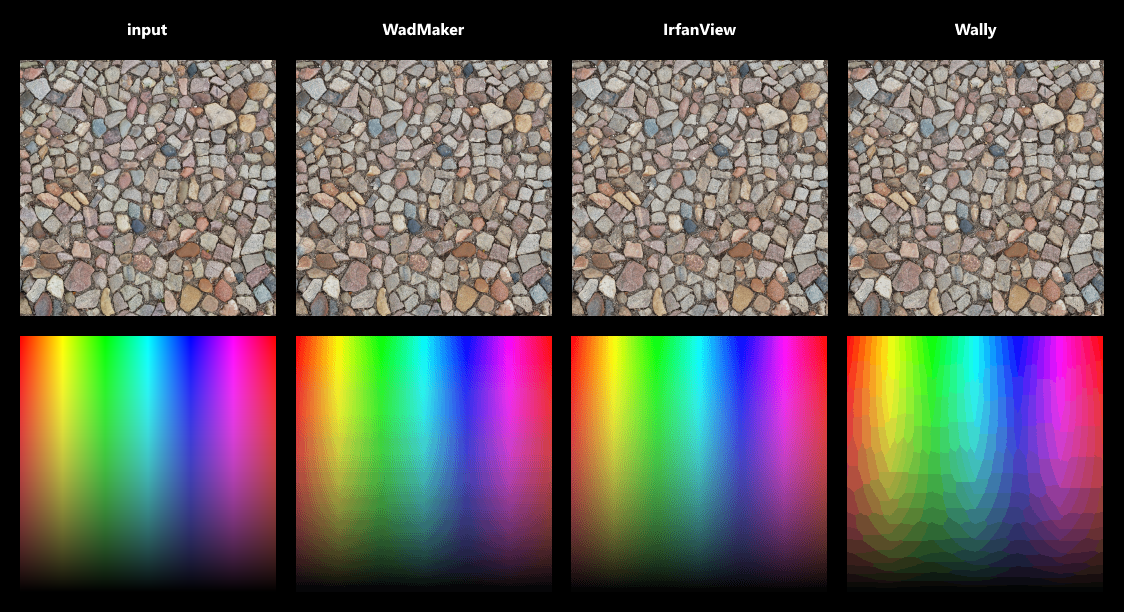
If you're interested, here's how I'm making palettes: https://github.com/pwitvoet/wadmaker/blob/master/Shared/Colo... . It starts with creating a color histogram (the 'frequency list'), and then it treats these colors as 3D points within a 256x256x256 'RGB cube'. It calculates the bounding box for these colors and then splits this box along the longest edge. It then takes the box with the most colors and splits it up, and repeats that process until it has created 256 boxes. Ideally, these boxes will all be fairly small, which means that they contain very similar colors. A palette can then be created by taking the average color of each box (weighted by color frequency). When combined with dithering this produces quite reasonable results: https://raw.githubusercontent.com/pwitvoet/wadmaker/master/d... (but clearly there is still room for improvement!)
Unfortunately sorting colors by frequency and then taking every Nth color causes a notable loss of quality. A median-cut or octree-based algorithm is more suitable, and dithering can further improve the results. For the tool I'm working on (WadMaker) I settled on using a modified median-cut algorithm and dithering with an adjustable scale. This produces results that are on-par and sometimes better than Wally, though for images with lots of distinct colors and gradients I haven't been able to beat IrfanView.
One thing that surprised me is just how deep this subject goes. Color clustering, perception, gamma correction, non-linear vs linear color spaces... the more I read the more I realize just how much more there is to learn.