

iod
Joined 12 years ago
Karma
326
Submissions
83
Member since
Jun 14
Joined 12 years ago
¹ https://u-boot.org/blog/seeing-is-believing-video-support-la...
For example, right now I have an old armhf i.MX6 Wandboard Quad that runs:
U-Boot -> UEFI (with Secure Boot if desired) -> Systemd Boot (or Linux EFI Boot Stub) -> Debian (or other distro)
Some arm devices such as the i.MX6, are strict on the placement of their boot firmware where it would interfere with a normal GPT table. One solution to this is to use a special "--move-main-table" option in gdisk² so that the GPT doesn't clobber U-Boot. While technically GPT is optional as long as U-Boot can read your main partition, I still always setup GPT anyway or Systemd Boot complains.
CUSE is userspace character device driver emulation. It allows you to emulate hardware without compiling a new kernel module. I just used it recently to write a hardware device supporting IOCTLs using Python. However I didn't find any good Python libraries that worked easily and documentation was lacking, but I found it easy enough that I ended up writing it using just the ctypes ffi library. The only part that wasn't immediately intuitive for me, as someone who has never written kernel drivers, is how IOCTL's require the buffers to be resized for each read and write which means the calls come in pairs, but luckily CUSE has a debug mode which shows all bytes in and out. CUSE was originally implemented to create userspace sound devices¹ but has also been use for things like custom TTYs. I used it for creating a virtual SPI device. Hopefully someone finds this useful and this project can get more attention.
¹ https://developers.cloudflare.com/stream/webrtc-beta
² https://blog.cloudflare.com/webrtc-whip-whep-cloudflare-stre...
"permanent":true
¹ https://janus.conf.meetecho.com/docs/streaming#streamapi
I wrote a little helper shell code using wget, openssl, dd, jq, and jo to make it easy to talk JSON to the API, for the one-off configs I do. Here is an example of what I use which demonstrates simulcast and srtp ingestion for both h264 and vp8 video streams as well as opus audio. Just fill in the [ ]'s with your specifics. I then use ffmpeg to generate all the streams and pipe to the appropriate ports for each simulcast level and target. If you use gstreamer beware srtp key format is different.
  #!/bin/sh
  server="https://[YOUR_JANUS_SERVER_HOST]/janus"
  token(){ dd if=/dev/urandom bs=6 count=1 status=none|openssl base64;}
  post_jo(){ first="$1";shift;wget --quiet --output-document - --post-data "$(jo -- "$@")" "$server$first";}
  tx(){ post_jo "$@" transaction="$(token)";}
  data_id(){ jq ".data.id//(null|halt_error(1))";}
  message()( set -e
    id="$(tx / janus=create|data_id)" # create janus session and store id
    hn="$(tx "/$id" janus=attach plugin=janus.plugin.streaming|data_id)" # create plugin session and store id
    tx "/$id/$hn" janus=message body="$(jo -- "$@")"
    tx "/$id" janus=destroy >/dev/null
  )

  # example usage:

  # list all streams
  message request=list|jq .plugindata.data.list

  # remove stream with id 666
  message request=destroy id=666 secret=adminpwd permanent=true|jq

  # create new stream
  message request=create id=666 secret=adminpwd permanent=true name=[YOUR_STREAM_NAME] type=rtp media=["$(
    jo type=video mid=v1 codec=h264 pt=96 simulcast=true svc=false port=5010 port2=5020 port3=5030 \
      fmtp=level-asymmetry-allowed=1\;packetization-mode=1\;profile-level-id=42c01f
    )","$(
    jo type=video mid=v2 codec=vp8 pt=96 simulcast=true svc=false port=5012 port2=5022 port3=5032
    )","$(
    jo type=audio mid=a codec=opus pt=97 port=5000
    )"] srtpsuite=80 srtpcrypto=zzzzzzzzzzzzzzzzzzzzzzzzzzzzzzzzzzzzzzzz|jq # your srtp token needs to match your source

  # show new stream info to verify configuration
  message request=info id=666 secret=adminpwd|jq

  # on streaming source device
  ffmpeg [YOUR_INPUT_CONFIG HERE] -f rtp -srtp_out_suite SRTP_AES128_CM_HMAC_SHA1_80 -srtp_out_params zzzzzzzzzzzzzzzzzzzzzzzzzzzzzzzzzzzzzzzz srtp://[YOUR_JANUS_SERVER_HOST]/:[PORT]

  # for gstreamer, showing alternative key format
gst-launch-1.0 [YOUR_INPUT_CONFIG HERE] ! rtpav1pay ! srtpenc key=cf3cf3cf3cf3cf3cf3cf3cf3cf3cf3cf3cf3cf3cf3cf3cf3cf3cf3cf3cf3 ! udpsink host=[YOUR_JANUS_SERVER_HOST] port=[PORT] media.peerconnection.ice.obfuscate_host_addresses = false
https://webrtc.github.io/samples/src/content/peerconnection/...
If you do not get any valid candidates, then it is most likely a misconfiguration of your browser, vpn, firewall or network. Unfortunately this is most likely not a Janus thing, but I would need more information to know for sure.
Here is the library's streaming demo:
Use a free signalling server from the webtorrent community. You can skip the torrent part of the implementation and just use the signalling, it's awesome. You can use a libraries like:
https://github.com/webtorrent/bittorrent-tracker
https://github.com/subins2000/p2pt
to get started. For me, I found the protocol is simple enough where I just use small vanilla javascipt implementation to talk to the websocket servers to generate the signalling messages. I wish more people knew about this and realize how easy it can be to bring WebRTC to their applications.
List of some free webtorrent trackers:
  wss://tracker.openwebtorrent.com
  wss://tracker.files.fm:7073
  wss://tracker.webtorrent.dev
Some free stun servers for NAT traversal:
  stun:stun.cloudflare.com
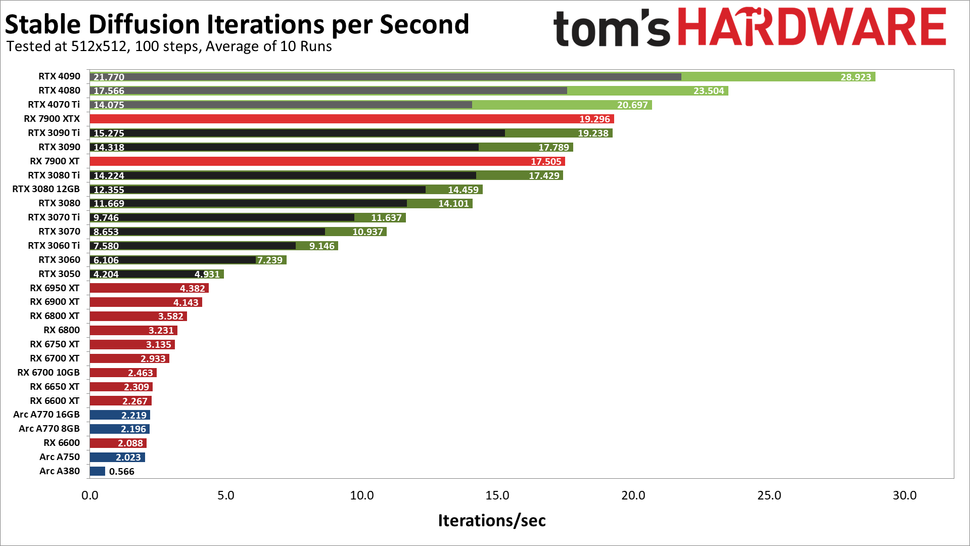
stun:stun.l.google.com:19302Here is a link to a tom's HARDWARE stable diffusion benchmark from January to get a rough idea on where various cards fit in for that use case:
https://www.tomshardware.com/news/stable-diffusion-gpu-bench...
In the article they show a performance comparison chart here:
https://cdn.mos.cms.futurecdn.net/iURJZGwQMZnVBqnocbkqPa-970...
¹ https://en.wikipedia.org/wiki/GUID_Partition_Table#Features